PDF to Images Tool

PDF to Images - Export PDF to PNG/JPG

Control sharpness,clarity,and size of the PDF to image conversion with PDF Champ. An advanced application to export PDF to JPG/PNG quickly & effortlessly.

Total Ratings:524- Average Rating:4.9 out of 5

100% Safe & Secure | No Credit Card Required

  • Allow you to export PDF data into an image
  • Convert PDF to JPEG for compressed images
  • Export PDF files to PNG for sharp images
  • Set the image resolution form 150 to 300 DPI
  • Provide batch conversion
  • Convert PDF to images without modify content
  • An interactive application to operate independently
  • Free trial to closely evaluate performance of the tool
PDF Champ PDF to Images Tool - Professional PDF to image conversion software interface showing format selection (PNG/JPG),page range options,DPI quality settings,and batch conversion controls

System Requirements

Ensure Compatibility of Your System

Operating System

Support Windows 11,10,8.1 & 7 (64-bit)

RAM

Require Only 2 GB
Recommended 4 GB

Disk Space

Only 500 MB free space for installation

Prerequisites

No additional tools and internet

How to Convert PDF to Images

Follow the Conversion Steps

1️⃣

Open PDF to Images

After launching the application,select "PDF to Images" in the Basic Tools window.

2️⃣

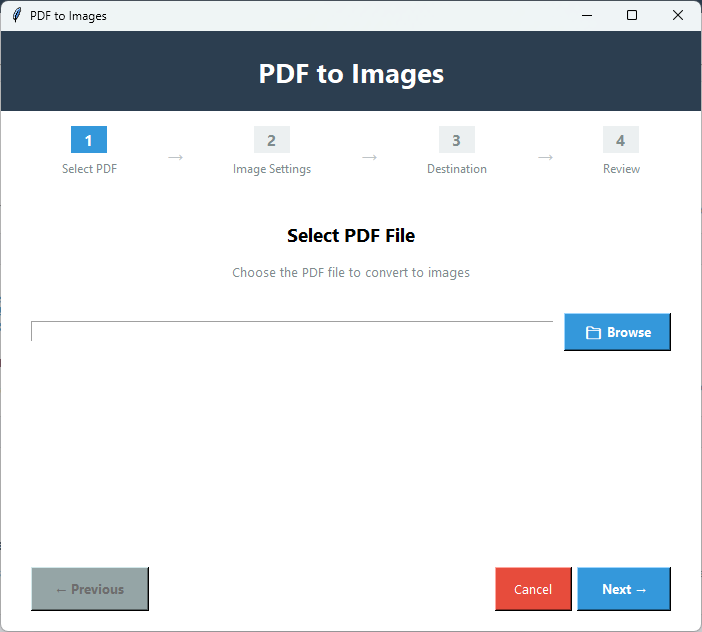
Select PDF File

Press 'Browse' to chose a locally saved PDF file that you wish to export to image.

3️⃣

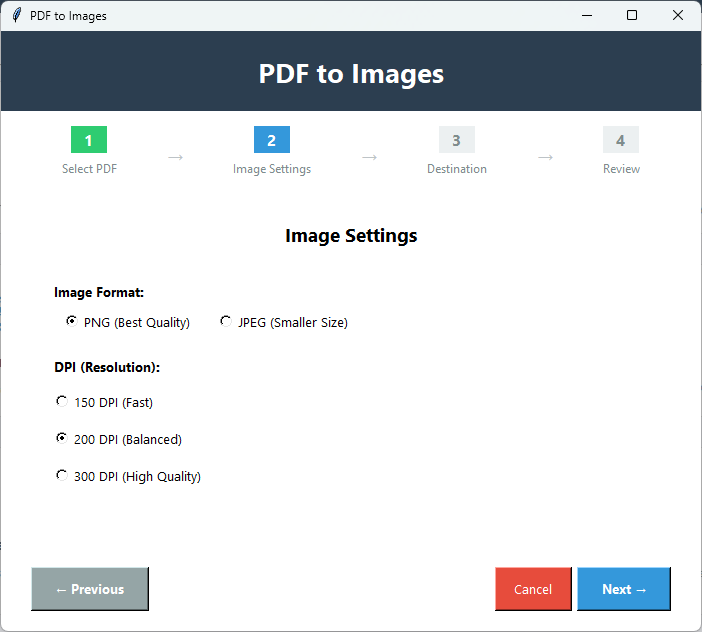
Image Format

In Image settings window,select the image format- PNG or JPEG.

4️⃣

Set DPI Resolution

Select anyone DIP option to achieve the desired image resolution.

5️⃣

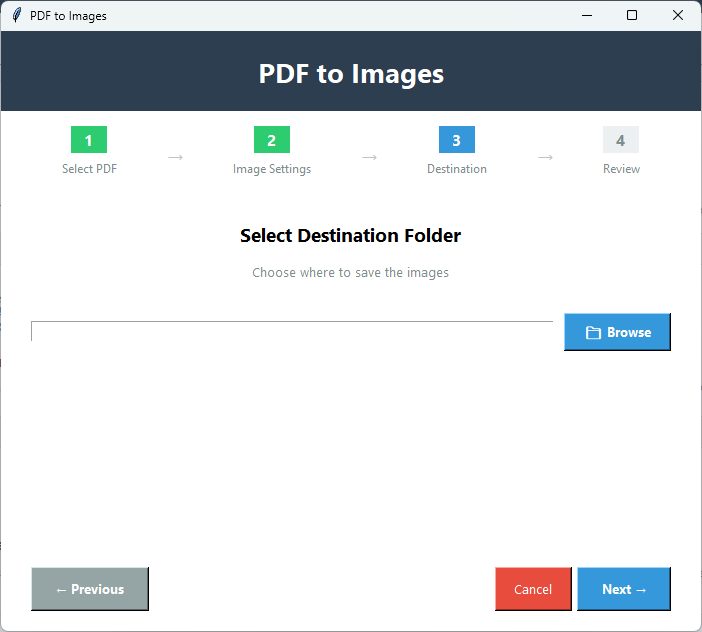
Save PDF

Press Next and click 'Browse' to direct the tool about the location where you want to save the images in the system.

6️⃣

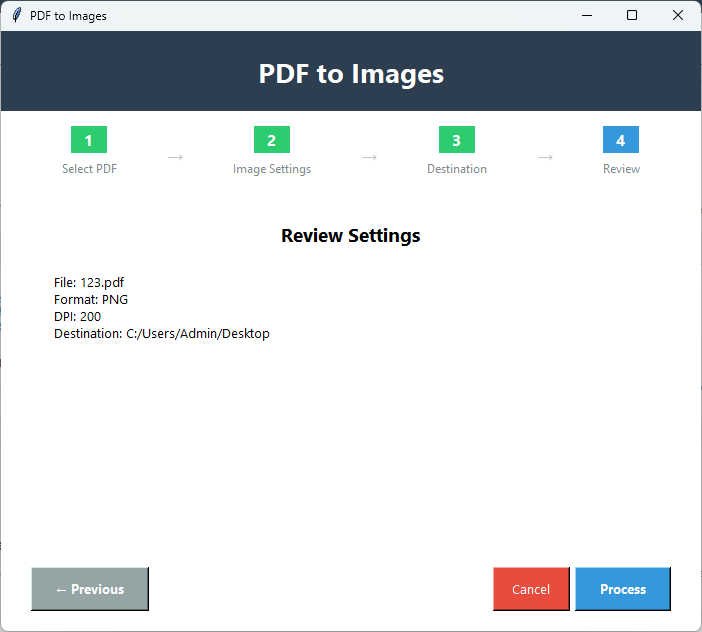
Review

In Review Settings,learn about the image format,DPI,PDF file name,and destination you have selected.

7️⃣

Final Button

Press 'Process' in the review settings to start conversion.

Key Features of PDF to Images

Significance of the Application

🖼️

Convert PDF to Images

This advanced application supports effortless solutions to convert PDF to images. The image setting window allows you to select various parameters for images.

📷

Convert PDF to JPEG

The tool can convert PDF files to JPEG within a few clicks to make sharing of data fast and use the PDF information for various purposes like web pages and blogging.

🖼️

Convert PDF to PNG

This advanced tool can convert PDF files to PNG to achieve high-quality images without losing details of data. Such images are excellent for editing,annotation,web development,and web design.

🎨

Control on Image Quality

In case,you want to control the image resolution further,the tool offers DIP resolution to achieve fast,balanced,and high-quality results.

📄

Convert Whole Pages

It converts the entire pages of a PDF file into image. This is how you can make the PDF file more interactive and easier to share.

💾

Design Preservation

While converting data,it preserves the original structure,design,layout,margins,tables,fonts,and other details of PDF files.

Demo vs Full Version Comparison

See what you get with the full version

FeatureDemo VersionFull Version
Convert to PNGAvailableAvailable
Convert to JPGAvailableAvailable
Page SelectionAvailableAvailable
Quality/DPI ControlAvailableAvailable
Number of PagesLimitedUnlimited
Batch ConversionLimitedUnlimited
Output WatermarkYes - "PDF Champ" on imagesNo watermark
PriceFreePurchase required

PDF to Images Screenshots

Click on images to zoom and view in detail

PDF Champ PDF to images converter interface showing PDF file selection,format options (PNG/JPG),page range selection,and DPI quality settings
PDF to image conversion configuration displaying page range input (1-5,10-15),output format selection,DPI adjustment slider,and output folder settings
Conversion progress showing PDF pages being converted to high-quality PNG images with automatic naming and quality preservation
Final converted images displayed showing multiple PNG/JPG files created from PDF pages with preserved quality,layout,and design

Why Convert PDF to Image?

Designed for Personal & Professional Users

📤

Easy Sharing

This application will convert PDF into JPEG images which are lightweight and easy to share.

📱

Social Media

By converting PDF tables and text into images,you can share the information on various social media platforms and drive engagement.

🌐

Online Posts

Bloggers and website owners can share PDF data online after converting data into images. It will not affect the system speed.

📊

Presentations

This conversion process is helpful during presentation because images are used in PowerPoint,Google Slides,or other presentation software.

What Our Users Say About PDF to Images

Clients Feedback

"We heavily depend on PDF for data sharing. But for specific page sharing,we prefer the conversion of PDF to images. This tool helps us a lot by reducing our dependence on unreliable sources."

Satisfied User

"Our graphic designers often demand PDF-to-image conversion. We rely on this tool for safe extraction of all components of PDFs in PNG format."

Satisfied User

"I like this application for its multiple features that have simplified PDF-related tasks. The best part is that I don't need Adobe Acrobat or any promotional tools. It is safe and simple."

Satisfied User

FAQs

Get Answers of Most Probable Questions

Can I export PDF data in WEBP?

This advanced application supports two common image formats- JPEG and PNG.

Can I set the image format and DIP resolution together?

It allows you to set both of them together. You have multiple options to set the image resolution.

What are the benefits of its free trial version?

It is one of the best ways to learn the key functions of the app practically. It helps you decide how useful the application is for you.

Does it support conversion of protected PDFs?

It has unlocked password feature. You can apply it first to unlock a locked file and then go for conversion.

How does the converted image save in the system?

It automatically saves to the destination you have provided with the original file name and the page number.