Images to PDF Converter

Images to PDF - Convert Images to PDF with Layout Options

Now,convert images to PDF within a few clicks! The tool combines multiple images into a single PDF document. It preserves content quality and customizes the layout by offering multiple options. Download its free trial now.

Total Ratings:425- Average Rating:4.8 out of 5

100% Safe & Secure | No Credit Card Required

  • Convert images to PDF in batch
  • Support JPG,PNG,BMP,TIFF,and other image formats
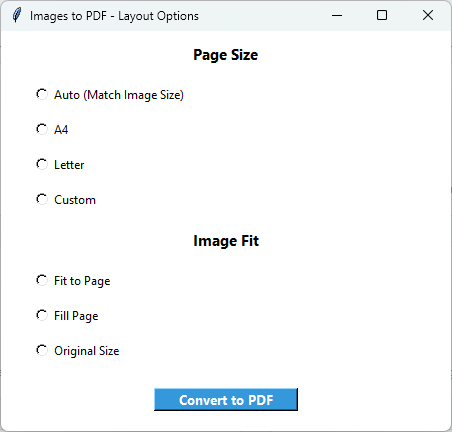
  • Offer various options to customize page size like A4 and Letter
  • Option for image fit such as fit to page and original size
  • Allow you to rearrange images before conversion
  • Keep the image content intact during migration
  • A lightweight and interactive application
  • Free trial for limited images to understand the key functions
PDF Champ Images to PDF Converter - Professional image to PDF conversion software interface showing multiple image selection and layout options

System Requirements

Examine Your System Compatibility

Operating System

A Windows application,support Wins 11,10,& old versions

RAM

Require 2GB
Recommended 4 GB

Disk Space

Only 500 MB free space

Prerequisites

A standalone advanced application

How to Convert Images to PDF

Simple Conversion Steps to Follow

1️⃣

Open Images to PDF

Launch PDF Champ and select 'Image to PDF' in the Basic Tool window.

2️⃣

Select Image Files

Click 'Browse' to choose images that you want to convert into PDF.

3️⃣

Reorder Images

For multiple images,you can change the order to get the PDF file in the same order.

4️⃣

Choose Page Size

Select the page size- Auto,A4,Letter,or custom.

5️⃣

Choose Image Fit

Also select the image fit- fit to page,fill page,or original size.

6️⃣

Save PDF

Click 'Browse' to save the PDF file in a specific location in the system.

7️⃣

Convert to PDF

Press the final button to achieve the conversion result.

Key Features of Images to PDF

Powerful Features of the Application

🖼️

Convert Images to PDF

This application supports conversion of images into a PDF file. You can convert PNG,JPEG,BIT,and images of any format into PDF within a few steps.

📦

Batch Conversion

It allows you to categorize images of one subject and convert them into a single PDF file. This feature helps you to avoid data clutter and encourage easy data organization.

🔄

Reorder Images

If the selected images are not in correct order,you can reorder them because the tool converts images into PDF in their exact order.

Restore Quality

During conversion,the tool assures high-quality results. All properties of images are restored. You can view text,tables,and images clearly after conversion.

📐

Set the Page Size

The page size customization is available. You can select any one option including auto,A4,letter,and custom to find the correct size of your PDF file.

📏

Image Fit

It allows you to resize the images before you convert them. The tool offers fit to page,fill page,and original size features.

Demo vs Full Version Comparison

See what you get with the full version

FeatureDemo VersionFull Version
Convert Images to PDFAvailableAvailable
Multiple ImagesLimited (few images)Unlimited
Layout OptionsAvailableAvailable
Page Size OptionsAvailableAvailable
Image QualityPreservedPreserved
Image ReorderingAvailableAvailable
Output WatermarkYes - "PDF Champ" on all PDFsNo watermark
PriceFreePurchase required

Images to PDF Screenshots

Click on images to zoom and view in detail

PDF Champ Images to PDF converter interface showing multiple image selection,layout options,page size settings,and preview of converted PDF document

Why Convert Images to PDF?

Reasons to Convert Images to PDF

📸

Photo Albums

Converting photos into PDFs is one of the best ways to archive your memories in an organized way. It makes sharing of photos also easy.

📄

Document Scanning

It is the process where each page of a PDF file are scanned and convert into images for professional use.

📋

Image Portfolios

If you are looking to create an impressing image portfolio,conversion of images into PDF is the best idea. It makes sharing and distribution of your portfolio easy.

📚

E-books

To publish an e-book,you can convert the image-based content into readable PDF e-books

What Our Users Say About Images to PDF

Our Clients Feedback

"Our company deals with several different types of applications for which we need smooth conversion from images to PDF. This tool helps us achieve this goal within a few clicks. Its auto-filling form feature has also reduced our work pressure."

Satisfied User

"I like this application to deal with various PDF issues. Splitting,merging,adding annotations,locking,unlocking,and conversion take place without the need for any third-party solution."

Satisfied User

"For 100% accurate conversion from images to PDF,it is a well-recommended tool. Its simple steps convert multiple images into PDFs without losing the layout and quality."

Satisfied User

FAQs

Common Questions

Does this tool convert JPEG to PDF?

This advanced application supports the conversion of images in any format.

Can I export multiple images?

It supports conversion of multiple images.

Can this app resize page size?

It offers various options to change the page size. Download its trial version to practically evaluate the application functions.

What is the free trial version?

The free trial version helps you learn the prominent features of this application. It can convert a limited number of images.

Is it an independent application?

This is an independent application. You can run it without installation of Adobe or any other tool.